| Computer History Year/Enter | Computer History Inventors/Inventions | Computer History Description of Event |
| Konrad Zuse - Z1 Computer | First freely programmable computer. | |
| John Atanasoff & Clifford Berry ABC Computer | Who was first in the computing biz is not always as easy as ABC. | |
| Howard Aiken & Grace Hopper Harvard Mark I Computer | The Harvard Mark 1 computer. | |
| John Presper Eckert & John W. Mauchly ENIAC 1 Computer | 20,000 vacuum tubes later... | |
| Frederic Williams & Tom Kilburn Manchester Baby Computer & The Williams Tube | Baby and the Williams Tube turn on the memories. | |
| John Bardeen, Walter Brattain & Wiliam Shockley The Transistor | No, a transistor is not a computer, but this invention greatly affected the history of computers. | |
| John Presper Eckert & John W. Mauchly UNIVAC Computer | First commercial computer & able to pick presidential winners. | |
| International Business Machines IBM 701 EDPM Computer | IBM enters into 'The History of Computers'. | |
| John Backus & IBM FORTRAN Computer Programming Language | The first successful high level programming language. | |
| Stanford Research Institute, Bank of America, and General Electric ERMA and MICR | The first bank industry computer - also MICR (magnetic ink character recognition) for reading checks. | |
| Jack Kilby & Robert Noyce The Integrated Circuit | Otherwise known as 'The Chip' | |
| Steve Russell & MIT Spacewar Computer Game | The first computer game invented. | |
| Douglas Engelbart Computer Mouse & Windows | Nicknamed the mouse because the tail came out the end. | |
| ARPAnet | The original Internet. | |
| Intel 1103 Computer Memory | The world's first available dynamic RAM chip. | |
| Faggin, Hoff & Mazor Intel 4004 Computer Microprocessor | The first microprocessor. | |
| Alan Shugart &IBM The "Floppy" Disk | Nicknamed the "Floppy" for its flexibility. | |
| Robert Metcalfe & Xerox The Ethernet Computer Networking | Networking. | |
| Scelbi & Mark-8 Altair & IBM 5100 Computers | The first consumer computers. | |
| Apple I, II & TRS-80 & Commodore Pet Computers | More first consumer computers. | |
| Dan Bricklin & Bob Frankston VisiCalc Spreadsheet Software | Any product that pays for itself in two weeks is a surefire winner. | |
| Seymour Rubenstein & Rob Barnaby WordStar Software | Word Processors. | |
| IBM The IBM PC - Home Computer | From an "Acorn" grows a personal computer revolution | |
| Microsoft MS-DOS Computer Operating System | From "Quick And Dirty" comes the operating system of the century. | |
| Apple Lisa Computer | The first home computer with a GUI, graphical user interface. | |
| Apple Macintosh Computer | The more affordable home computer with a GUI. | |
| Microsoft Windows | Microsoft begins the friendly war with Apple. | |
Monday, 10 September 2012
COMPUTER HISTORY TABLE

Sunday, 9 September 2012
History of Linux
History of Linux
Table of Contents| a. In The Beginning |
| b. New Baby in the horizon |
| c. Confrontation and development |
| d. A Decade of Linux |
| e. Tux: The Spirit of Linux |
| f. Some Linux Cookies |
| g. Timeline |
| h. Links |
| i. Acknowledgments |
a. In The Beginning
It was 1991, and the ruthless agonies of the cold war were gradually coming to an end. There was an air of peace and tranquility that prevailed in the horizon. In the field of computing, a great future seemed to be in the offing, as powerful hardware pushed the limits of the computers beyond what anyone expected.
But still, something was missing.
And it was the none other than the Operating Systems, where a great void seemed to have appeared.
For one thing, DOS was still reigning supreme in its vast empire of personal computers. Bought by Bill Gates from a Seattle hacker for $50,000, the bare bones operating system had sneaked into every corner of the world by virtue of a clever marketing strategy. PC users had no other choice. Apple Macs were better, but with astronomical prices that nobody could afford, they remained a horizon away from the eager millions.
The other dedicated camp of computing was the Unixworld. But Unix itself was far more expensive. In quest of big money, the Unix vendors priced it high enough to ensure small PC users stayed away from it. The source code of Unix, once taught in universities courtesy of Bell Labs, was now cautiously guarded and not published publicly. To add to the frustration of PC users worldwide, the big players in the software market failed to provide an efficient solution to this problem.
A solution seemed to appear in form of MINIX. It was written from scratch by Andrew S. Tanenbaum, a US-born Dutch professor who wanted to teach his students the inner workings of a real operating system. It was designed to run on the Intel 8086 microprocessors that had flooded the world market.
As an operating system, MINIX was not a superb one. But it had the advantage that the source code was available. Anyone who happened to get the book 'Operating Systems: Design and Implementation' by Tanenbaum could get hold of the 12,000 lines of code, written in C and assembly language. For the first time, an aspiring programmer or hacker could read the source codes of the operating system, which to that time the software vendors had guarded vigorously. A superb author, Tanenbaum captivated the brightest minds of computer science with the elaborate and immaculately lively discussion of the art of creating a working operating system. Students of Computer Science all over the world pored over the book, reading through the codes to understand the very system that runs their computer.
And one of them was Linus Torvalds.Back
b. New Baby in the Horizon
In 1991, Linus Benedict Torvalds was a second year student of Computer Science at the University of Helsinki and a self-taught hacker. The 21 year old sandy haired soft-spoken Finn loved to tinker with the power of the computers and the limits to which the system can be pushed. But all that was lacking was an operating system that could meet the demands of the professionals. MINIX was good, but still it was simply an operating system for the students, designed as a teaching tool rather than an industry strength one.
At that time, programmers worldwide were greatly inspired by the GNU project by Richard Stallman, a software movement to provide free and quality software. Revered as a cult hero in the realm of computing, Stallman started his awesome career in the famous Artificial Intelligence Laboratory at MIT, and during the mid and late seventies, created the Emacs editor. In the early eighties, commercial software companies lured away much of the brilliant programmers of the AI lab, and negotiated stringent nondisclosure agreements to protect their secrets. But Stallman had a different vision. His idea was that unlike other products, software should be free from restrictions against copying or modification in order to make better and efficient computer programs. With his famous 1983 manifesto that declared the beginnings of the GNU project, he started a movement to create and distribute softwares that conveyed his philosophy (Incidentally, the name GNU is a recursive acronym which actually stands for 'GNU is Not Unix'). But to achieve this dream of ultimately creating a free operating system, he needed to create the tools first. So, beginning in 1984, Stallman started writing the GNU C Compiler(GCC), an amazing feat for an individual programmer. With his legendary technical wizardry, he alone outclassed entire groups of programmers from commercial software vendors in creating GCC, considered as one of the most efficient and robust compilers ever created.
 Richard Stallman, father of the GNU Project
By 1991, the GNU project created a lot of the tools. The much awaited Gnu C compiler was available by then, but there was still no operating system. Even MINIX had to be licensed.(Later, in April 2000, Tanenbaum released Minix under the BSD License.) Work was going the GNU kernel HURD, but that was not supposed to come out within a few years.
That was too much of a delay for Linus.
In August 25, 1991 the historic post was sent to the MINIX news group by Linus .....
| From: torvalds@klaava.Helsinki.FI (Linus Benedict Torvalds) Newsgroups: comp.os.minix Subject: What would you like to see most in minix? Summary: small poll for my new operating system Message-ID: <1991Aug25.205708.9541@klaava.Helsinki.FI> Date: 25 Aug 91 20:57:08 GMT Organization: University of Helsinki Hello everybody out there using minix - I'm doing a (free) operating system (just a hobby, won't be big and professional like gnu) for 386(486) AT clones. This has been brewing since april, and is starting to get ready.I'd like any feedback on things people like/dislike in minix, as my OS resembles it somewhat (same physical layout of the file-system(due to practical reasons) among other things). I've currently ported bash(1.08) and gcc(1.40),and things seem to work.This implies that I'll get something practical within a few months, andI'd like to know what features most people would want. Any suggestions are welcome, but I won't promise I'll implement them :-) Linus (torvalds@kruuna.helsinki.fi) PS. Yes - it's free of any minix code, and it has a multi-threaded fs. It is NOT protable (uses 386 task switching etc), and it probably never will support anything other than AT-harddisks, as that's all I have :-(. |
| From: torvalds@klaava.Helsinki.FI (Linus Benedict Torvalds) Newsgroups: comp.os.minix Subject: Free minix-like kernel sources for 386-AT Message-ID: <1991Oct5.054106.4647@klaava.Helsinki.FI> Date: 5 Oct 91 05:41:06 GMT Organization: University of Helsinki Do you pine for the nice days of minix-1.1, when men were men and wrote their own device drivers? Are you without a nice project and just dying to cut your teeth on a OS you can try to modify for your needs? Are you finding it frustrating when everything works on minix? No more all-nighters to get a nifty program working? Then this post might be just for you :-) As I mentioned a month(?)ago, I'm working on a free version of a minix-lookalike for AT-386 computers. It has finally reached the stage where it's even usable (though may not be depending on what you want), and I am willing to put out the sources for wider distribution. It is just version 0.02 (+1 (very small) patch already), but I've successfully run bash/gcc/gnu-make/gnu-sed/compress etc under it. Sources for this pet project of mine can be found at nic.funet.fi (128.214.6.100) in the directory /pub/OS/Linux. The directory also contains some README-file and a couple of binaries to work under linux (bash, update and gcc, what more can you ask for :-). Full kernel source is provided, as no minix code has been used. Library sources are only partially free, so that cannot be distributed currently. The system is able to compile "as-is" and has been known to work. Heh. Sources to the binaries (bash and gcc) can be found at the same place in /pub/gnu. |
Linux version 0.03 came in a few weeks. By December came version 0.10. Still Linux was little more than in skeletal form. It had only support for AT hard disks, had no login ( booted directly to bash). version 0.11 was much better with support for multilingual keyboards, floppy disk drivers, support for VGA,EGA, Hercules etc. The version numbers went directly from 0.12 to 0.95 and 0.96 and so on. Soon the code went worldwide via ftp sites at Finland and elsewhere.
Backc. Confrontation & Development

Linus displays Linux running on a notebook pc
Soon Linus faced some confrontation from none other than Andrew Tanenbaum, the great teacher who wrote MINIX. In a post to Linus, Tanenbaum commented:
| "I still maintain the point that designing a monolithic kernel in 1991 is a fundamental error. Be thankful you are not my student. You would not get a high grade for such a design :-)" (Andrew Tanenbaum to Linus Torvalds) |
Tanenbaum also remarked that : "Linux is obsolete".
Now was the turn for the new Linux generation. Backed by the strong Linux community, Linus gave a reply to Tanenbaum which seems to be most fitting:
| Your job is being a professor and researcher: That's one hell of a good excuse for some of the brain-damages of minix. (Linus Torvalds to Andrew Tanenbaum) |
And work went on. Soon more than a hundred people joined the Linux camp. Then thousands. Then hundreds of thousands. This was no longer a hackers toy. Powered by a plethora of programs from the GNU project, Linux was ready for the actual showdown. It was licensed under GNU General Public License, thus ensuring that the source codes will be free for all to copy, study and to change. Students and computer programmers grabbed it.
Soon, commercial vendors moved in. Linux itself was, and is free. What the vendors did was to compile up various software and gather them in a distributable format, more like the other operating systems with which people were more familiar. Red Hat , Caldera, and some other companies gained substantial amount of response from the users worldwide. While these were commercial ventures, dedicated computer programmers created their very own volunteer-based distribution, the famed Debian. With the new Graphical User Interfaces (like X-window System, KDE,GNOME)the Linux distributions became very popular.
Meanwhile, there were amazing things happening with Linux. Besides the PC, Linux was ported to many different platforms. Linux was tweaked to run 3Com's handheld PalmPilot computer. Clustering technology enabled large number of Linux machines to be combined into a single computing entity, a parallel computer. In April 1996, researchers at Los Alamos National Laboratoryused Linux to run 68 PCs as a single parallel processing machine to simulate atomic shock waves. But unlike other Supercomputers costing a fortune, it was rather cheap. The do-it-yourself supercomputer cost only $152,000, including labor (connecting the 68 PCs with cables)-about one tenth the price of a comparable commercial machine. It reached a peak speed of 19 billion calculations per second, making it the 315th most powerful supercomputer in the world. And it was a robust one too. Three months later it still didn't have to be rebooted.

A Beaming Linus Today
The best thing about Linux today is the fanatic following it commands. Whenever a new piece of hardware is out, Linux kernel is tweaked to take advantage of it. For example, within weeks after the introduction of Intel Xeon® Microprocessor, Linux kernel was tweaked and was ready for it. It has also been adapted for use in Alpha, Mac, PowerPC, and even for palmtops, a feat which is hardly matched by any other operating system. And it continues its journey into the new millennium, with the same enthusiasm that started one fine day back in 1991.

Linus in 2002
As for Linus, he remains a simple man. Unlike Bill Gates, he is not a billionaire. Having completed studies, he moved to USA and landed a job at Transmeta Corporation. After conducting a top-secret research and development project, Transmeta launched the Crusoeâ„¢ processor. Linus was an active member of the research team. Recently married to Tove, he is the proud father of a girl, Patricia Miranda Torvalds. But he remains as the world's most favorite and most famous programmer to this date. Revered by Computer communities worldwide, Linus is by far the most popular programmer on this planet.
Backd. After a Decade: Linux Today
Proving all the warning and prophecies of the skeptics wrong, Linux has completed a decade of development. Today, Linux is one of the fastest growing operating systems in the history. From a few dedicated fanatics in 1991-92 to millions of general users at present, it is certainly a remarkable journey. The big businesses have 'discovered' Linux, and have poured millions of dollars into the development effort, denouncing the anti-business myth of the open-source movement. IBM corp. once considered the archenemy of open-source hacker community, has come forward with a huge fund for development of open source Linux based solutions. But what's really amazing is the continuously increasing band of developers spread throughout the world who work with a fervent zeal to improve upon the features of Linux. The development effort is not, as many closed-sourced advocates accuse, totally engulfed with chaos. A well designed development model supervised by some maintainers is adopted. Along with this, there are thousands of developers working to port various applications to Linux.
Commercial enterprises are no longer wary of Linux. With a large number of vendors providing support for Linux based products, it is no longer a 'do-at-your-own-risk' thing to use Linux at the office. As for reliability, Linux certainly proved it during the nasty attacks of the CIH virus in 1999 and the love bug a year later, during which Linux based machines proved to be immune to the damages caused by these otherwise quite simple computer viruses. Linux startups like Red Hat received a cordial response as they went public. And even after the dot-com bust of the recent years, these companies continue to thrive and grow. With this added confidence, many large and small businesses have adopted Linux based servers and workstations as an integral part of their offices.
Rise of the Desktop Linux
What is the biggest complain against Linux? Perhaps in the past, it was the text based interface which scared off many people from using it. 'Text mode gives total control', some dedicated hackers and heavy users may explain. But for the millions of ordinary people, it also means a lot of effort towards learning the system. The existing X-Window system and the window managers were not up to the general computer users' expectation. Exactly this argument had always been put forward by dedicated followers of the Windows(TM) camp. But things began to change in the last couple of years. The advent of professional looking desktop environments like KDE( K Desktop Environment) and GNOME completed the picture. The recent versions of these desktop environment have changed the general perception about the 'user friendliness' of Linux to a great extent. Though hard-core users grumble about the loss of purity of the hacker-culture, this great change in the mindset of the common users has increased the popularity of Linux.
Today, almost distributions of Linux include user-friendly GUIs. Installation has also become easier. Gone are the days when users would need detailed expertise in computer hardware to install Linux ... distributions like Ubuntu, Debian, Suse, Knoppix, and Red Hat's Fedora Core can be installed by even novice users. Most distributions are also available in Live CD format, which the users can just put in their CD drives and boot without installing it to the hard drive, making Linux available to the newbies.
Linux in the Developing World
Perhaps the greatest change is the spread of Linux to the developing world. In the days before Linux, developing countries were way behind in the field of computing. The cost of hardware fell down, but the cost of software was a huge burden to the cash-strapped computer enthusiasts of the Third World countries. In desperation, people resorted to piracy of almost all sorts of software products. This resulted in widespread piracy, amounting to billions of dollars. But then again, the pricetag of most of the commercial products were far beyond the reaches of the people in developing countries. For example, a typical operating system product costs at least US $100 or more. But in countries with per capita incomes of about US$200-300, is a huge amount.
The rise of Linux and other related open source product has changed it all. Since Linux can be scaled to run in almost computer with very few resources, it has become a suitable alternative for low budget computer users. Old, ancient 486/Pentium 1 computers that has become a part of history in the developed world are still used in developing countries. And Linux has enabled to unleash the full potential of these computers. The use of open source software has also proliferated, since the price of software is a big question. In countries of Asia, Africa and Latin America, Linux has appeared as a way out for the masses of computer enthusiasts. And a testament to the true global nature of Linux, local customizations were made in obscure parts of the world. The Linux documentation now includes documents written in almost all the major languages ... and also many minor ones, for example, Vietnamese.
From Desktop to SuperComputing
When Linux was first envisaged by Linus Torvalds, it was just another hackers hobby. But from the humble Intel 386 machine of Linus that ran the first kernel, Linux has come a long way. Its most notable use now is in the field of massively parallel supercomputing clusters.
In August 2001, BBC reported that the US Government was planning to build what would be a mega computer, capable of performing over 13 trillion calculations per second (13.6 TeraFLOPS). The project, called Teragrid would consist of a connected network of 4 US supercomputing centers. The four labs that are collaborating to create the Teragrid are: National Center for Supercomputing Applications at the University of Illinois(NCSA), San Diego Supercomputer Center (SDSC) at the University of California Argonne National Laboratory in Chicago; California Institute of Technology in Pasadena. At each of these centers, there would be a supercomputer. In total, there would be more than 3000 processors running in parallel to create the Tetragrid.
By 2005, the use of Linux became more prevalent in Supercomputing. The 2005 Top500 list of Supercomputers shows that 4 of the top 5 fastest supercomputers use Linux as their operating system.
The Journey Continues
The journey of Linux from a hacking project to globalization has been more like an evolutionary experience. The GNU Project, started in the early 1980's by Richard Stallman, laid the foundation for the development of open source software. Prof. Andrew Tanenbaum's Personal Computer operating system Minix brought the study of operating systems from a theoretical basis to a practical one. And finally, Linus Torvald's endless enthusiasm for perfection gave birth to Linux. Throughout the last couple of years, hundreds of thousands of people forming global community nurtured it and brought it to its glorious place in the annals of the computer revolution. Today Linux is not just another student's hacking project, it is a worldwide phenomenon bringing together huge companies like IBM and the countless millions of people throughout the world in the spirit of the open source software movement. In the history of computing, it will forever remain as one of the most amazing endeavors of human achievement.
e. Tux the penguin: Linux's Dear Logo
The logo of Linux is a penguin. Unlike other commercial products of computer operating systems, Linux doesn't have a formidable serious looking symbol. Rather Tux, as the penguin is lovingly called, symbolizes the carefree attitude of the total movement. This cute logo has a very interesting history. As put forward by Linus, initially no logo was selected for Linux. Once Linus went to the southern hemisphere on a vacation. There he encountered a penguin, not unlike the current logo of Linux. As he tried to pat it, the penguin bit his hand. This amusing incident led to the selection of a penguin as the logo of Linux sometime later.
Backf. Some Linux Cookies
Here are some famous words by Linus himself.Dijkstra probably hates me
(Linus Torvalds, in kernel/sched.c)
"How should I know if it works? That's what beta testers are for. I only
coded it."
(Attributed to Linus Torvalds, somewhere in a posting)
"I'm an idiot.. At least this one [bug] took about 5 minutes to find.."
(Linus Torvalds in response to a bug report.)
"If you want to travel around the world and be invited to speak at a lot
of different places, just write a Unix operating system."
(By Linus Torvalds)
> > Other than the fact Linux has a cool name, could someone explain why I
> > should use Linux over BSD?
> No. That's it. The cool name, that is. We worked very hard on
> creating a name that would appeal to the majority of people, and it
> certainly paid off: thousands of people are using linux just to be able
> to say "OS/2? Hah. I've got Linux. What a cool name". 386BSD made the
> mistake of putting a lot of numbers and weird abbreviations into the
> name, and is scaring away a lot of people just because it sounds too
> technical.
(Linus Torvalds' follow-up to a question about Linux)
> The day people think linux would be better served by somebody else (FSF
> being the natural alternative), I'll "abdicate". I don't think that
> it's something people have to worry about right now - I don't see it
> happening in the near future. I enjoy doing linux, even though it does
> mean some work, and I haven't gotten any complaints (some almost timid
> reminders about a patch I have forgotten or ignored, but nothing
> negative so far).
> Don't take the above to mean that I'll stop the day somebody complains:
> I'm thick-skinned (Lasu, who is reading this over my shoulder commented
> that "thickheaded is closer to the truth") enough to take some abuse.
> If I weren't, I'd have stopped developing linux the day ast ridiculed me
> on c.o.minix. What I mean is just that while linux has been my baby so
> far, I don't want to stand in the way if people want to make something
> better of it (*).
Linus
> (*) Hey, maybe I could apply for a saint-hood from the Pope. Does
> somebody know what his email-address is? I'm so nice it makes you puke.
(Taken from Linus's reply to someone worried about the future of Linux)
`When you say "I wrote a program that crashed Windows", people just stare at
you blankly and say "Hey, I got those with the system, *for free*".'
(By Linus Torvalds)
back
G. Timeline of Linux History
| Date | Event |
|---|---|
| 1984 | |
| January 1984 | Richard Stallman quits his job at MIT and starts working on the GNU Project. |
| 1985 | |
| Month unknown | Free Software Foundation, an organization for creating and promoting free software, is founded by Richard Stallman. |
| March 1985 | The GNU manifesto, a statement by Richard Stallman advocating the cause of free software movement, is published in the March 1985 issue of Dr. Dobb's Journal |
| 1991 | |
| August 25 1991 | Linus conceives the idea of Linux and announces the project in a Usenet Post |
| September 1991 | Version 0.01 is released on the Net |
| 1992 | |
| January 1992 | First Linux Newsgroup: alt.os.linux founded in the UseNet |
| April 1992 | Ari Lemmke starts the popular Linux newsgroup comp.os.linux in the UseNet |
| November 1992 | Adam Richter announces the release of the first Linux Distribution from his company: Yggdrasil |
| 1993 | |
| June 1993 | Slackware, the famous Linux distribution is released by Peter Volkerding |
| August 1993 | Matt Welsh releases Linux Installation and getting started: version 1 |
| 1994 | |
| March 1994 | Linux kernel version 1.0 is released |
back
H. Links
Here are some links on the history of Linux which you may find helpful.
| www.linux.org | A website with help on Linux related issues. |
| www.cs.helsinki.fi/u/torvalds | Web site of Linus Torvalds ... contains some funny comments and photos of Linus Torvalds and his family. (Linus claims himself to be a www-illiterate :) |
| www.slashdot.org | A website devoted to geeks and other tech-minded people. Contains some interesting contemporary and historical information on Linux and other free technologies. |
| http://en.wikipedia.org/wiki/Linux | Wikipedia article on Linux |
| http://en.wikipedia.org/wiki/GNU | Wikipedia article on the GNU Project |
| Sponsored links--> | |
History of KEY BOARD
Keyboard History
*This article is a work in progress. Chapters will be published as a series of installments over the course of the weeks to come. Please comment your feedback to improve this draft.


*This article is a work in progress. Chapters will be published as a series of installments over the course of the weeks to come. Please comment your feedback to improve this draft.
Keyboards and typing technology have come a long way over the past couple centuries. The first typing devices were designed and patented in the 1700s while the first manufactured typing devices came about in the 1870s. These machines featured “blind typing” technology, where characters were printed on upside-down pages that remained unseen until completion. Since then, we have seen several updates in design, layout, technology, and function that are more efficient and user-friendly. The type-writer has changed shape dramatically over the years, eventually becoming electronic- then practically obsolete as we moved into the age of computers and the birth of the keyboard. The keyboard is the number one computer interface used around the world, and an integral object for many of us that most people take for granted. This paper will explore the history of typing, detailing the innovations across time that have accumulated into the definition of today’s standard for the ultimate typing experience.
Jump to:
- Chapter One: Design – The Evolution of the Typewriter
- Chapter Two: Design – The Development of the Computer Keyboard
- Chapter Three: Design – Computer Keyboard Layouts
Chapter One: Design – The Evolution of the Typewriter
To begin exploration of the first keyboards, we must first examine the origins of typing and the first typing devices. What did the first typing machines look like? The first manufactured typewriters resembled sewing machines more than what most people imagine when they think “typewriter.” Remington, who manufactured the first typewriters, were also manufacturing sewing machines at the time, leading to this initial design atheistic. The first Remington typewriters, created by Sholes, Glidden, and Soule even came with a foot pedal (like a sewing machine) to control carriage returns. So how did we get to where we are now, in the high-tech age of computers and plastics? To move forward, its important to first move backwards in time and see how these first commercially successful type-writers came to be.
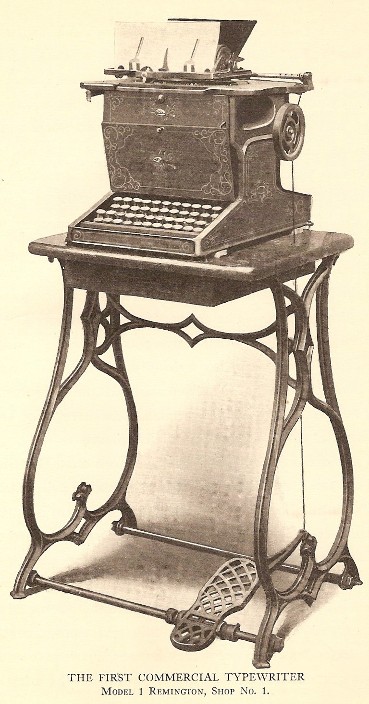
Remington's First Sholes & Glidden Type-Writer 1867
Image source: from the Early Office Museum
Technically the first documented typing devices predate the Remington’s Sholes & Glidden typewriter, though none of them were manufactured for commercial use. In 1714, the first patent for a typing machine was issued in London, England to Henry Mill. Though there is no evidence that the machine was in fact constructed, or sold, all we know is that this typing device was intended to prepare legal documents in a manner that was neat, legible, and in a standardized format. Fast forward to 1808, another typing machine was patented to Pellegrino Turri in Italy. His machine was intended to allow the blind to “write.” With Pellegrino Turri’s typing device, also came the first Carbon Copy. Pellegrino’s invention of the carbon copy has made a lasting impact on the modern office (carbon copies are still regularly used on triplicate forms, phone message and memo pads, sales receipts etc.). In 1829 William Austin Burt also created a writing mechanism, a “Typowriter” that instead of keys, used dials to print characters, making this process slower than handwriting to produce words on a page, but it was a way to print legible, uniform text. The typowriter was also created with the intended use for the blind. A later model of the typowriter, created by John Jones in 1852 is pictured below. None of these devices gained much public interest, or commercial success.
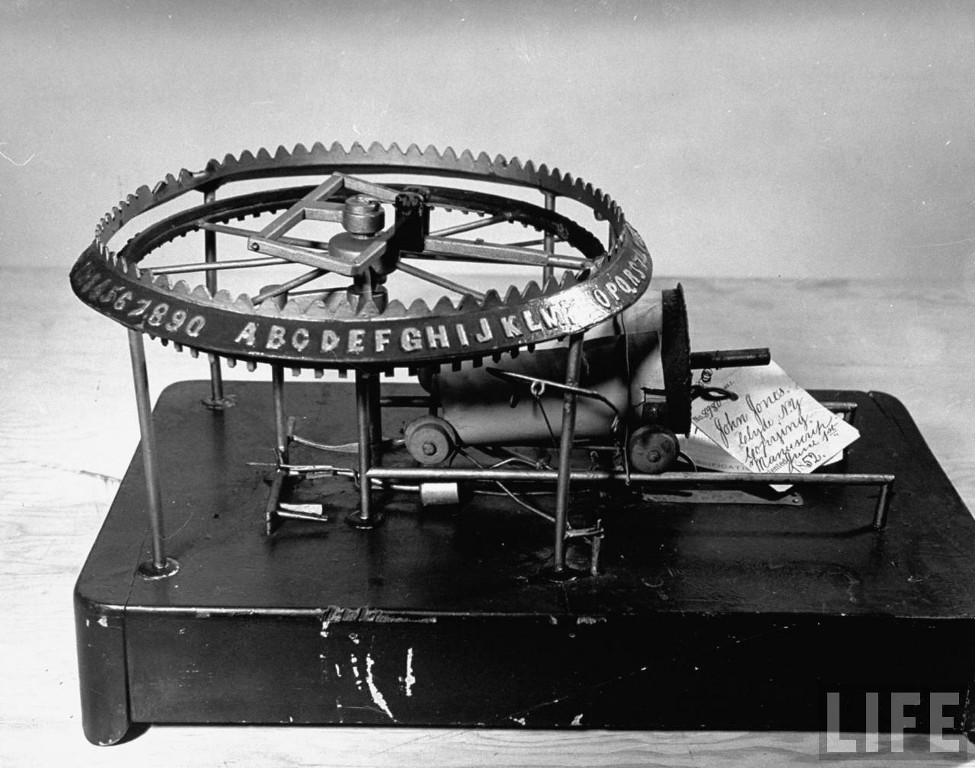
1852 John Jones’ Mechanical Typographer
Image source: Life photo archive
From 1829 up until 1870 there were many other typing devices that were patented along with the ones mentioned above, and like the previous devices none of them went into commercial production, or mainstream use. The only ones worth mentioning, for the sake of being extraordinary were Father Francisco Jaâo de Azevado’s “homemade” typewriter made from wood and knives in Brasil (1861), and Denmark’s Hansen Writing Ball (1865), both pictured below. Father Azevado’s typewriter is arguably the first “typewriter” as the mechanism is the most similar to the commercial models that followed its inception. It was completely constructed of household materials which makes it particularly interesting and impressive. Brazilians argue that his invention should be credited as the First Typewriter. Moving across the globe to Denmark just a few years later, The Hansen Writing Ball was invented by Reverend Rasmus Malling-Hansen, in 1865. The half-sphere shape of the ball is unlike any other typing device before or after it, and regardless of visual appeal, The Hansen Writing Ball actually gained quite a bit of attention in Europe and England as a fully functional typing device. It is documented that Hansen Writing Balls could be found in operation up until 1909 in many offices and businesses in England and Europe. Because of the relative success of this product, Malling-Hansen released a few different versions of this invention. His first Writing Ball began as an electric device, but later he released the “Tall Model” in 1875- where no electricity was needed. The fact that it no longer required electricity resulted in a broader range of consumers in various rural and urban locales.
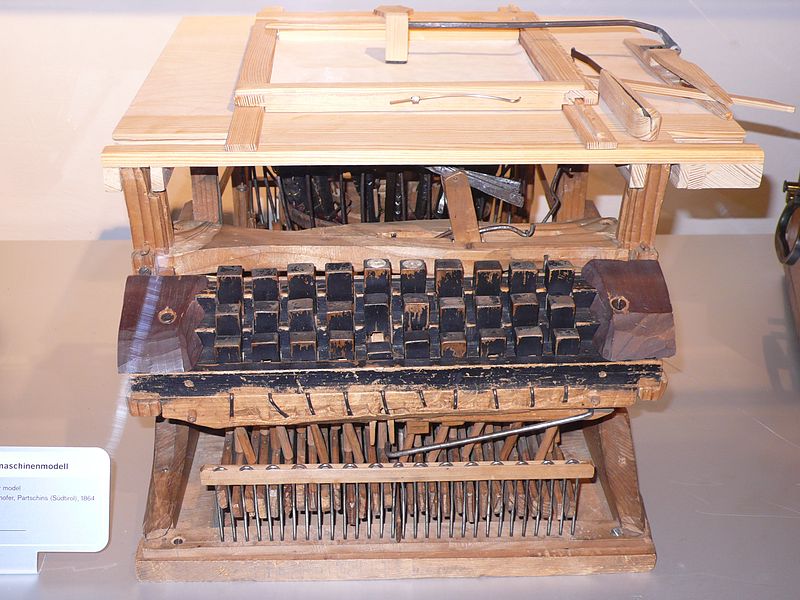
Reproduction of 1861 Father Francisco Jaâo de Azevado Typewriter
Image source: Wikimedia Commons
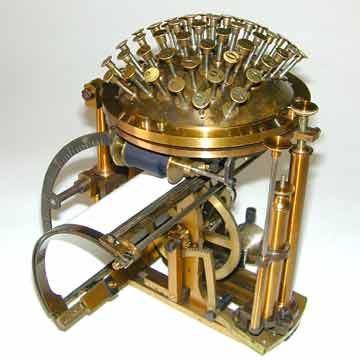
1870 Hansen Writing Ball. Created by Reverend Rasmus Malling-Hansen in Denmark. © 2011 by AUCTION TEAM BREKER, Cologne, Germany (www.Breker.com)
Click this link to view additional images of the Hansen Writing Ball
Soon after the the Hansen Writing Ball’s creation, Sholes (an Inventor), Glidden (a Mechanic), and with the help of Soule (a Printer) came along with their 1867 type-writer that changed the world of typing as we know it. It is this “Type-Writer” that gave us the word typewriter, and is the model that is referred to as “The First Typewriter.” Interestingly enough, though this was the most successful typing device of that time, Sholes and Glidden were too frustrated by slow sales so they sold their patent to Densmore and Yost for $12,000. Machinist and clock-maker Matthais Schwalbach made the Sholes and Glidden typewriter in Milwaukee, and had Remington manufacture and sell it. Soon after this sewing-machine-like model was created and sold, the foot pedal was removed with carriage returns being controlled on the typewriter itself. Following this change, a slightly smaller, desk-top version of the typewriter came to be (though still extremely heavy and full of metal), losing the sewing machine look and defining its own look as a typewriter. By 1910 all typewriters were more or less standardized, sharing very similar resemblances across the board, until the IBM Selectric was introduced in 1961.
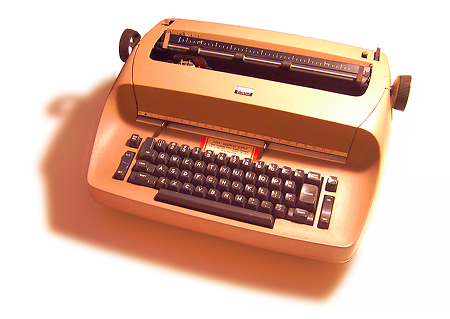
1961 Selectric I Typewriter by IBM
Image Source: Wikipedia
The Selectric typewriter, no longer used type-bars that struck the page. The Selectrics used typeballs (resembling golf balls) that rolled, tilted, and printed the letters on the page without the typebars. This was huge, because typewriter jams (when two typebars interlocked if you typed too fast) were no longer an issue. This increased typing speed, and efficiency. The other new element brought to the typewriter scene with the Selectrics was that the typeballs could easily be taken out, and replaced with others to change fonts quickly on the same document. This was also a major advancement in the industry. Though the Selectrics were still quite heavy, large, hunks of metal that were difficult to move around, the typeballs were small, easy to move, accessories that gave typists more freedom and accessibility. The Selectric Typewriter was produced up until the 1980s with three models that evolved over the course of those decades: The Selectric I, The Selectric II, and The Selectric III. They were available in a variety of colors including: vintage blue, mossy green, burnt red, beige, and black.
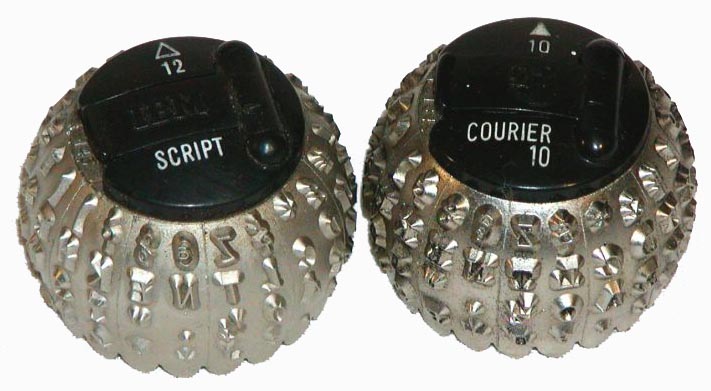
Selectric Type Balls
Image Source: Early Office Museum
The typewriter has come a long way over the years, all leading into the age of computers and the most widely used input device: the computer keyboard. Though the first computers and computer keyboards were created before the Selectric, these power-house typewriters were so great at putting text on the page that they continued to be used alongside keyboards, as computers gained in popularity. Hunter S. Thompson was known to write on one, and some writers such as David Sedaris to this day still use and prefer their Selectric Typewriter. Typewriters have largely been replaced and taken over by the keyboard as the preferred, and most used typing device. A few years ago, rumors generated by the Daily Mail even went as far to publish that the, ”Last Typewriter Factory Left in the World Close[d] its Doors” which as it turns out was an exaggeration, and false (as confirmed by NPR). Though the age of typewriters has faded and they have become more of a novelty than a necessity, several government offices continue to use typewriters to produce legal documents, which has kept and will keep typewriters in production, at least for the time being.
The History and Evolution of Keyboard Layouts
QWERTY Layout:
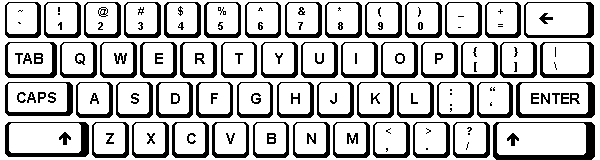
The most widely used keyboard layout is QWERTY, named as such for the positioning of the keys in the top left row. Christopher Latham Sholes and Carlos Glidden produced the first typewriter featuring the QWERTY layout in 1874 and though there have been minor changes over the past centuries, for the most part it has remained consistent. One of the differences of the original QWERTY layout from the current version was its lack of a “1″ key, and consequently “!” key. Instead of typing the numeral one, typists would use the lower-case L (l). To type an exclamation mark, typists would use a period (.), hit backspace, then type an apostrophe (‘) above it. Another key added in later versions was the “=” and “+” key. These symbols were used very infrequently on typewriters as it was generally assumed that Adding Machines were used to do all the mathematical notation. If typists wanted to produce a plus-sign, they would type a hyphen (-), hit backspace, then type a colon (:). When they wanted to type an equal sign, they would type a hyphen (-), hit backspace, and then type an underscore (_).
At the start of the QWERTY layout, typewriters were only able to print UPPER CASE letters, as the “shift key” had not yet been introduced. At the end of the 19th century in 1894, The Duplex full keyboard brought lower case letters to the typewriter by featuring separate keys for lower case and UPPER CASE letters. There were twice as many keys with this design which eventually lead to the invention of the “shift key.” The shift key allowed for a consolidated keyboard similar to the first models that only typed capital letters, as well as the use of both lower and uppercase characters with the same key. Additionally, having a shift key allowed the numerical keys to be shared with special characters such as the ampersand (&) and percent (%) signs for further keyboard consolidation. One problem that arose after the shift key was added was that holding down the shift key to type more than one letter at a time was particularly difficult on early typewriters. This lead to the “SHIFT LOCK” key, later to be renamed “CAPS LOCK” by modern typists. Shift lock allowed typists to switch back and forth between lower and upper case characters, as well as numerical and special characters with ease.
1897, Jewett 4 Duplex typewriter - Courtesy of the Martin Howard Collection at antiquetypewriters.com
QWERTY layouts were developed as a means to slow typists down. In the beginning stages of the typewriter, people typed so quickly, that they often jammed the keys as they flew up to hit the typewriter ribbon. To prevent this, QWERTY was born to decrease typing efficiency and speed. This is why, rather than placing the most commonly used letters in convenient, central, finger placements, they are instead found in awkward locations, like the “A” key under the left pinkie finger. Likewise, the less commonly used letters are placed in the prime areas of the layout. Notice, for example how the “J” and “K” keys are under the right pointer and middle fingers. With these inconvenient placements, more than 50% of keystrokes take place on the top row, and roughly 30% take place on the bottom row. That means that less than 20% of all keystrokes actually occur where your fingers are centrally placed, the row commonly referred to as “home row.” So if this layout is so inefficient and awkward, why are we still using it today?
The QWERTY layout has stuck with us for the past century for two reasons: it was the first established layout that everyone grew accustomed to and accepted; and when computers began to come into play, the leaders in the computer keyboard industry opted to keep the QWERTY layout on their manufactured keyboards- effectively binding generations of typists to an inefficient layout. When IBM and the other major manufacturers chose to stick with QWERTY, everyone else followed their lead. Thus they established the standard in layout design for decades to come- regardless of how inefficient and outdated.
Dvorak Simplified Layouts:
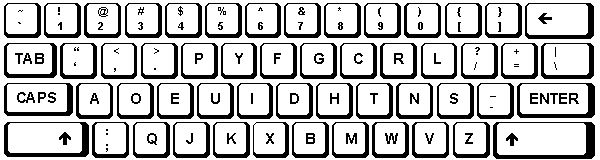
The QWERTY model keyboard is still used today by some of the world’s fastest typists, but imagine how much faster and more efficient typing could be if the keys we use most often were under the strongest of our fingers in the easiest to access areas. That’s where Dvorak comes in. The Dvorak simplified layout was introduced in 1936 by Dr. August Dvorak, and offers a keyboard layout that is more intuitive and efficient for modern typists.
Dr. Dvorak conducted extensive research on the English language (and other languages using the Roman alphabet), and studied the physiology of the hand. Dr. Dvorak’s research brought forth not only the Dvorak layout, but also two additional keyboard layouts designed for people with one hand: one keyboard for those with only one right hand, and the other for those with only a left.


These single-handed keyboards allow one-handed typists to easily type 50 WPM. If he was able to design a keyboard easy for one-handed typists to use, imagine the functionality and efficiency possible for two-handed typists. On a Dvorak keyboard, all of the most commonly used characters fall under the “home row.” He placed the vowels: “A,” “O”, “E,” “U,” and “I,” under the left hand; and the letters: “D,” “H,” “T,” “N,” and “S,” under the right hand.
In addition to the awkward placement of common letters, the QWERTY design also requires the same finger to type common letter combinations, and the same hand to type common words. All of these elements aided in slowing down typists, to limit typewriter jams. Dvorak noticed this speed bump, and took it into consideration for his simplified layout, where the same finger or hand aren’t required to type all of the characters in frequent letter-combinations and words while the other fingers or hand sit idly.
The simplified Dvorak layout was slightly modified and adjusted over the years and finally solidified in 1982. The design requires less finger-motion, which both increases typing speed and reduces finger strain. It is also supposedly much easier to learn since the characters fall in less awkward positions, and the most common letters are all lined up next to each other on the home row. Dvorak layouts never overcame the popularity of QWERTY layouts, even though Dvorak is compatible with almost all modern computer models (including Mac OS X, Microsoft Windows, Linux, and BSD-UNIX).
This goes to show the power and control that comes with simply being the first. In the eyes of the vast majority of the typing public, it’s “easier” to use the more difficult, and strain-inducing layout rather than start anew with something better. No matter how poorly QWERTY translates to modern typists, for many of us, it’s our “first language” and learning a new language takes a lot of time, dedication, and studying.
Other Specialty Layouts and Novelties: Colemak
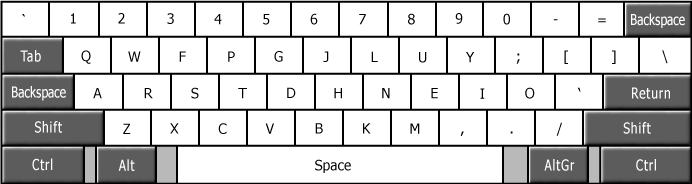
The third most popular keyboard layout after QWERTY, then Dvorak, is the Colemak layout. Though this layout hasn’t reached as much of a fan base of the first two, it has gained some notoriety. Because only 17 keys differ from the QWERTY layout, this keyboard layout is fairly easy to relearn after years of QWERTY use. This has helped the Colemak layout to gain a following amongst typists who no longer want to adhere to an outdated QWERTY mode of typing, but are frustrated with the learning curve involved in readjusting to the Dvorak layout. Colemak is named after its creator, Shai Coleman, though Shai decided to match the last two letters to the Dvorak layout namesake (hence, Colemak), to perhaps appeal more to the alternative keyboard layout seeking community and draw some similarities between the two. This is the youngest of the three layouts discussed, though layout designs and updates continue to be tested and developed on a regular basis. Due to the popularity of the three layouts discussed, all other options receive little to no recognition or public attention. The main focus of newer alternative keyboard layouts tends to be an emphasis on mixing the familiarity of QWERTY with the efficiency of Dvorak. Who knows what will evolve in the years to come, only time will tell.
*******************************************
Evolution and History of KEY BOARD
Typing Through Time: Keyboard History
*This article is a work in progress. Chapters will be published as a series of installments over the course of the weeks to come. Please comment your feedback to improve this draft.
Keyboards and typing technology have come a long way over the past couple centuries. The first typing devices were designed and patented in the 1700s while the first manufactured typing devices came about in the 1870s. These machines featured “blind typing” technology, where characters were printed on upside-down pages that remained unseen until completion. Since then, we have seen several updates in design, layout, technology, and function that are more efficient and user-friendly. The type-writer has changed shape dramatically over the years, eventually becoming electronic- then practically obsolete as we moved into the age of computers and the birth of the keyboard. The keyboard is the number one computer interface used around the world, and an integral object for many of us that most people take for granted. This paper will explore the history of typing, detailing the innovations across time that have accumulated into the definition of today’s standard for the ultimate typing experience.
Jump to:
- Chapter One: Design – The Evolution of the Typewriter
- Chapter Two: Design – The Development of the Computer Keyboard
- Chapter Three: Design – Computer Keyboard Layouts
Chapter One: Design – The Evolution of the Typewriter
To begin exploration of the first keyboards, we must first examine the origins of typing and the first typing devices. What did the first typing machines look like? The first manufactured typewriters resembled sewing machines more than what most people imagine when they think “typewriter.” Remington, who manufactured the first typewriters, were also manufacturing sewing machines at the time, leading to this initial design atheistic. The first Remington typewriters, created by Sholes, Glidden, and Soule even came with a foot pedal (like a sewing machine) to control carriage returns. So how did we get to where we are now, in the high-tech age of computers and plastics? To move forward, its important to first move backwards in time and see how these first commercially successful type-writers came to be.
Remington's First Sholes & Glidden Type-Writer 1867
Image source: from the Early Office Museum
Technically the first documented typing devices predate the Remington’s Sholes & Glidden typewriter, though none of them were manufactured for commercial use. In 1714, the first patent for a typing machine was issued in London, England to Henry Mill. Though there is no evidence that the machine was in fact constructed, or sold, all we know is that this typing device was intended to prepare legal documents in a manner that was neat, legible, and in a standardized format. Fast forward to 1808, another typing machine was patented to Pellegrino Turri in Italy. His machine was intended to allow the blind to “write.” With Pellegrino Turri’s typing device, also came the first Carbon Copy. Pellegrino’s invention of the carbon copy has made a lasting impact on the modern office (carbon copies are still regularly used on triplicate forms, phone message and memo pads, sales receipts etc.). In 1829 William Austin Burt also created a writing mechanism, a “Typowriter” that instead of keys, used dials to print characters, making this process slower than handwriting to produce words on a page, but it was a way to print legible, uniform text. The typowriter was also created with the intended use for the blind. A later model of the typowriter, created by John Jones in 1852 is pictured below. None of these devices gained much public interest, or commercial success.
1852 John Jones’ Mechanical Typographer
Image source: Life photo archive
From 1829 up until 1870 there were many other typing devices that were patented along with the ones mentioned above, and like the previous devices none of them went into commercial production, or mainstream use. The only ones worth mentioning, for the sake of being extraordinary were Father Francisco Jaâo de Azevado’s “homemade” typewriter made from wood and knives in Brasil (1861), and Denmark’s Hansen Writing Ball (1865), both pictured below. Father Azevado’s typewriter is arguably the first “typewriter” as the mechanism is the most similar to the commercial models that followed its inception. It was completely constructed of household materials which makes it particularly interesting and impressive. Brazilians argue that his invention should be credited as the First Typewriter. Moving across the globe to Denmark just a few years later, The Hansen Writing Ball was invented by Reverend Rasmus Malling-Hansen, in 1865. The half-sphere shape of the ball is unlike any other typing device before or after it, and regardless of visual appeal, The Hansen Writing Ball actually gained quite a bit of attention in Europe and England as a fully functional typing device. It is documented that Hansen Writing Balls could be found in operation up until 1909 in many offices and businesses in England and Europe. Because of the relative success of this product, Malling-Hansen released a few different versions of this invention. His first Writing Ball began as an electric device, but later he released the “Tall Model” in 1875- where no electricity was needed. The fact that it no longer required electricity resulted in a broader range of consumers in various rural and urban locales.
Reproduction of 1861 Father Francisco Jaâo de Azevado Typewriter
Image source: Wikimedia Commons
1870 Hansen Writing Ball. Created by Reverend Rasmus Malling-Hansen in Denmark. © 2011 by AUCTION TEAM BREKER, Cologne, Germany (www.Breker.com)
Click this link to view additional images of the Hansen Writing Ball
Soon after the the Hansen Writing Ball’s creation, Sholes (an Inventor), Glidden (a Mechanic), and with the help of Soule (a Printer) came along with their 1867 type-writer that changed the world of typing as we know it. It is this “Type-Writer” that gave us the word typewriter, and is the model that is referred to as “The First Typewriter.” Interestingly enough, though this was the most successful typing device of that time, Sholes and Glidden were too frustrated by slow sales so they sold their patent to Densmore and Yost for $12,000. Machinist and clock-maker Matthais Schwalbach made the Sholes and Glidden typewriter in Milwaukee, and had Remington manufacture and sell it. Soon after this sewing-machine-like model was created and sold, the foot pedal was removed with carriage returns being controlled on the typewriter itself. Following this change, a slightly smaller, desk-top version of the typewriter came to be (though still extremely heavy and full of metal), losing the sewing machine look and defining its own look as a typewriter. By 1910 all typewriters were more or less standardized, sharing very similar resemblances across the board, until the IBM Selectric was introduced in 1961.
1961 Selectric I Typewriter by IBM
Image Source: Wikipedia
The Selectric typewriter, no longer used type-bars that struck the page. The Selectrics used typeballs (resembling golf balls) that rolled, tilted, and printed the letters on the page without the typebars. This was huge, because typewriter jams (when two typebars interlocked if you typed too fast) were no longer an issue. This increased typing speed, and efficiency. The other new element brought to the typewriter scene with the Selectrics was that the typeballs could easily be taken out, and replaced with others to change fonts quickly on the same document. This was also a major advancement in the industry. Though the Selectrics were still quite heavy, large, hunks of metal that were difficult to move around, the typeballs were small, easy to move, accessories that gave typists more freedom and accessibility. The Selectric Typewriter was produced up until the 1980s with three models that evolved over the course of those decades: The Selectric I, The Selectric II, and The Selectric III. They were available in a variety of colors including: vintage blue, mossy green, burnt red, beige, and black.
Selectric Type Balls
Image Source: Early Office Museum
The typewriter has come a long way over the years, all leading into the age of computers and the most widely used input device: the computer keyboard. Though the first computers and computer keyboards were created before the Selectric, these power-house typewriters were so great at putting text on the page that they continued to be used alongside keyboards, as computers gained in popularity. Hunter S. Thompson was known to write on one, and some writers such as David Sedaris to this day still use and prefer their Selectric Typewriter. Typewriters have largely been replaced and taken over by the keyboard as the preferred, and most used typing device. A few years ago, rumors generated by the Daily Mail even went as far to publish that the, ”Last Typewriter Factory Left in the World Close[d] its Doors” which as it turns out was an exaggeration, and false (as confirmed by NPR). Though the age of typewriters has faded and they have become more of a novelty than a necessity, several government offices continue to use typewriters to produce legal documents, which has kept and will keep typewriters in production, at least for the time being.
Chapter Two: Design – The Development of the Computer Keyboard
While typewriters were widely used throughout the 1950s to the 1970s, computers were starting to emerge as a consumer friendly product, beginning the age of the computer keyboard as a primary input device. To understand the development of the computer keyboard, its important to understand the development and evolution of the computer. In 1946, the first computer, ENIAC was constructed and teletype was used to input data. As you can see below, the ENIAC computer took up an entire room, hundreds of times larger than the modern computer laptop. What was teletype and how is it different from from modern computer keyboard input?
 1946 ENIAC Computer, compared to Modern Laptop.
- 1950s UNIVAC Computer's Teletype Input Device. Courtesy of the Computer History Museum


1948 BINAC Computer with Women using Teletype Machine. Courtesy of the Computer History Museum
Teletype and ENIAC computers used cards (similar in shape to index cards) that were inserted into the Teletype while a series of holes called keypunches would be punched into the cards according to which keys were pressed on the teletype machine. After the cards were keypunched by the computer, they were brought over to a card-reader that would analyze the deck of cards as data (tangible memory).

Early Computer Punch card. Courtesy of the Computer History Museum.

1960 Keypunch Reader Courtesy of the Computer History Museum
In 1948 the BINAC computer used a different input/output method, with an electromagnetically controlled teletype to input data and print results. The BINAC is what paved the way for the shape of computers and computer keyboards to come, though it would still take a few more decades to move away from the teletype/punchcard computers. Another punchcard computer popular at the time, was the UNIVAC I, produced in 1951 is also pictured below.

1940s ENIAC Keypunch Printer and Card Sorter in operation. Image Courtesy of the Computer History Museum

1960s UNIVAC Computer in Operation. Notice the Teletype Input Device to his left. Courtesy of the Computer History Museum
In 1964, Bell Labs and M.I.T. created the MULTICS computer, a time-sharing, multi-user system with VDT, a video display terminal. Text was instantly visible on the screen as it was typed, which made communicating commands, programs, and controls to computers more efficient than previous teletype methods of input. By the late 1970s all computers used VDT and electric keyboards. It was simply the most straight-forward and user-friendly method of interacting with computers (no stack of cards to punch holes in and keep organized).
The first keyboards that were sold in the 1970s were all built from scratch, piece by piece, and were heavy as they were fully mechanical. Since so much time and effort was needed to create these keyboards, and since the target market was primarily computer programmers and engineers, they were built for function and not for visual aesthetics. This meant there wasn’t a keyboard cover or cabinet, making the keyboard more or less exposed.

1970s Altiar Computer with Exposed Keyboard Courtesy of the Computer History Museum
There were also keyboards that were built into personal computers at the time. In the mid-1970s Imsai and Altair created the first small PCs for consumer use, generally referred to as the S100 computer systems. These machines were built piece by piece, and provided the bare essentials. There were no hard drives or floppy discs on these first machines, so there was no way to save data on them. The keyboard was located on the front panel of the computer, as a set of key switches. If users wanted a standard keyboard, IBM sold a converted electric typewriter, but as supplies were limited and the product wasn’t in high demand many users had to convert their own electric typewriters if they wanted an easier to use keyboard to enter programming code. Additionally, a second keyboard had to be connected for data entry. It wasn’t provided with purchase, requiring that users had to build their own.

1970s IMSAI Computer with front panel key switches

1970s Altair Home Office Desk Set-Up. Courtesy of the Computer History Museum.
In the late 1970s Apple, Radio Shack and Commodore all had the foresight to see the large market in computer keyboards, and started manufacturing keyboards for their computers, paving the way for the modern assumption that all computers come with a keyboard, and that keyboards are the primary, standard input device. Below is a 1970s Radio Shack commercial for the TRS-80.
In 1984, IBM released their first PC, which came equipped with the Model M keyboard. This computer keyboard was wildly successful because it was so easy to use, users didn’t have to convert their typewriters or provide their own build of keyboard to use as an input device for their computers. The Model M was a mechanical keyboard, and used the highest quality construction, giving typists the satisfaction of tactile feedback, acute accuracy and comfort. The only draw backs on this keyboard was that the “Shift” and “Enter” keys were reportedly too small for the majority of user’s preferences. Because of this, IBM made and sold “Keytop Expanders” which fit over the shift and enter key-switches to expand the keys. All of the keyboards at this time were limited in that they were only offered in two colors: beige and grey, until the late 1980s when black was introduced as an option.

1984 IBM Model M Keyboard

Keytop Expanders Advertisement
In the 1990s membrane switches began to replace the mechanical key switch, as it was quieter, weighed less, and suited the needs of the new laptop generation. This was also an advantage for the manufactures because membrane keyboards were much cheaper to produce. Unfortunately the quality of the keyboard significantly dropped as these superficial keyboard aesthetics dominated (slimmer, quieter, lighter weight, easier to be mobile with). The technology and mechanics of these keyboards will be detailed in future chapters, and mechanical keyboard information can be found here: on our Mechanical Keyboard Guide. Here’s a photo showing the dramatic difference between early Apple mechanical keyboards (1983), and decades later the modern non-mechanical Apple keyboards (2010).

Apple-Keyboard-1983-vs-2010
Other changes in keyboard design, whether or not improving upon function, have included the folding keyboard, the water-proof (and washable) keyboard, the keyboard that also functions as a mouse, thumb-sized keyboards (for mobile devices and travel) and virtual touch-screen keyboards.

True Touch Roll-up Keyboard

Mouse and Keyboard Combo (The entire keyboard moves on the desk as a mouse)

Mini Wireless Keyboard Device

iPad and iPhone Virtual Touch-Screen Keyboards
Over the years there have been several other designs that verge on science fiction- like the laser keyboard, the flying saucer keyboard, the jellyfish keyboard, and the fully-programable, lcd-key display Optimus Maximus Keyboard. Its mind-bending to see the evolution of keyboards in terms of where they started as teletype machines and typewriters- to where they’ve evolved into all the options we have quite literally at our fingertips.

Laser Keyboard

Altuq Toprak's Flying Saucer keyboard

Jellyfish Keyboard. Industrial Designer: Erik Campbell. Inventor: Doug Engelbart.

Jellyfish Keyboard. Industrial Designer: Erik Campbell. Inventor: Doug Engelbart.

Optimus Maximus Keyboard
Keyboards come in all shapes, sizes, and colors these days, though it’s important to remember that without the original, simple, powerhouse mechanical keyboards of IBM we wouldn’t be where we are today. With all of the design innovations being manufactured, there is no surprise that many creative keyboard aficionados have started to emerge with their own inventive modifications to improve the typing experience and aesthetic. Richard “Doc” Nagy has taken his creativity, and craftsmanship to the next level in keyboard design and has built some very interesting and inventive keyboard mods that seem to have traveled back in time, with a paradoxically futuristic edge. From steam punk and art deco themed keyboards, to keyboards with scrabble tiles for keys, Doc’s modified mechanical keyboards are true works of art (and fully functional). Visit Doc’s site, Datamancer.net for his complete gallery.

The Alchemist Keyboard Courtesy of Doc at Datamancer

The Alchemist Keyboard Detail Courtesy of Doc at Datamancer

The Ergo Keyboard Courtesy of Doc at Datamancer

The Streamline Keyboard Courtesy of Doc at Datamancer

The Scrabble Keyboard Courtesy of Doc at Datamancer
Chapter Three: Design – The History and Evolution of Keyboard Layouts
QWERTY Layout:
The most widely used keyboard layout is QWERTY, named as such for the positioning of the keys in the top left row. Christopher Latham Sholes and Carlos Glidden produced the first typewriter featuring the QWERTY layout in 1874 and though there have been minor changes over the past centuries, for the most part it has remained consistent. One of the differences of the original QWERTY layout from the current version was its lack of a “1″ key, and consequently “!” key. Instead of typing the numeral one, typists would use the lower-case L (l). To type an exclamation mark, typists would use a period (.), hit backspace, then type an apostrophe (‘) above it. Another key added in later versions was the “=” and “+” key. These symbols were used very infrequently on typewriters as it was generally assumed that Adding Machines were used to do all the mathematical notation. If typists wanted to produce a plus-sign, they would type a hyphen (-), hit backspace, then type a colon (:). When they wanted to type an equal sign, they would type a hyphen (-), hit backspace, and then type an underscore (_).
At the start of the QWERTY layout, typewriters were only able to print UPPER CASE letters, as the “shift key” had not yet been introduced. At the end of the 19th century in 1894, The Duplex full keyboard brought lower case letters to the typewriter by featuring separate keys for lower case and UPPER CASE letters. There were twice as many keys with this design which eventually lead to the invention of the “shift key.” The shift key allowed for a consolidated keyboard similar to the first models that only typed capital letters, as well as the use of both lower and uppercase characters with the same key. Additionally, having a shift key allowed the numerical keys to be shared with special characters such as the ampersand (&) and percent (%) signs for further keyboard consolidation. One problem that arose after the shift key was added was that holding down the shift key to type more than one letter at a time was particularly difficult on early typewriters. This lead to the “SHIFT LOCK” key, later to be renamed “CAPS LOCK” by modern typists. Shift lock allowed typists to switch back and forth between lower and upper case characters, as well as numerical and special characters with ease.
1897, Jewett 4 Duplex typewriter - Courtesy of the Martin Howard Collection at antiquetypewriters.com
QWERTY layouts were developed as a means to slow typists down. In the beginning stages of the typewriter, people typed so quickly, that they often jammed the keys as they flew up to hit the typewriter ribbon. To prevent this, QWERTY was born to decrease typing efficiency and speed. This is why, rather than placing the most commonly used letters in convenient, central, finger placements, they are instead found in awkward locations, like the “A” key under the left pinkie finger. Likewise, the less commonly used letters are placed in the prime areas of the layout. Notice, for example how the “J” and “K” keys are under the right pointer and middle fingers. With these inconvenient placements, more than 50% of keystrokes take place on the top row, and roughly 30% take place on the bottom row. That means that less than 20% of all keystrokes actually occur where your fingers are centrally placed, the row commonly referred to as “home row.” So if this layout is so inefficient and awkward, why are we still using it today?
The QWERTY layout has stuck with us for the past century for two reasons: it was the first established layout that everyone grew accustomed to and accepted; and when computers began to come into play, the leaders in the computer keyboard industry opted to keep the QWERTY layout on their manufactured keyboards- effectively binding generations of typists to an inefficient layout. When IBM and the other major manufacturers chose to stick with QWERTY, everyone else followed their lead. Thus they established the standard in layout design for decades to come- regardless of how inefficient and outdated.
Dvorak Simplified Layouts:
The QWERTY model keyboard is still used today by some of the world’s fastest typists, but imagine how much faster and more efficient typing could be if the keys we use most often were under the strongest of our fingers in the easiest to access areas. That’s where Dvorak comes in. The Dvorak simplified layout was introduced in 1936 by Dr. August Dvorak, and offers a keyboard layout that is more intuitive and efficient for modern typists.
Dr. Dvorak conducted extensive research on the English language (and other languages using the Roman alphabet), and studied the physiology of the hand. Dr. Dvorak’s research brought forth not only the Dvorak layout, but also two additional keyboard layouts designed for people with one hand: one keyboard for those with only one right hand, and the other for those with only a left.
These single-handed keyboards allow one-handed typists to easily type 50 WPM. If he was able to design a keyboard easy for one-handed typists to use, imagine the functionality and efficiency possible for two-handed typists. On a Dvorak keyboard, all of the most commonly used characters fall under the “home row.” He placed the vowels: “A,” “O”, “E,” “U,” and “I,” under the left hand; and the letters: “D,” “H,” “T,” “N,” and “S,” under the right hand.
In addition to the awkward placement of common letters, the QWERTY design also requires the same finger to type common letter combinations, and the same hand to type common words. All of these elements aided in slowing down typists, to limit typewriter jams. Dvorak noticed this speed bump, and took it into consideration for his simplified layout, where the same finger or hand aren’t required to type all of the characters in frequent letter-combinations and words while the other fingers or hand sit idly.
The simplified Dvorak layout was slightly modified and adjusted over the years and finally solidified in 1982. The design requires less finger-motion, which both increases typing speed and reduces finger strain. It is also supposedly much easier to learn since the characters fall in less awkward positions, and the most common letters are all lined up next to each other on the home row. Dvorak layouts never overcame the popularity of QWERTY layouts, even though Dvorak is compatible with almost all modern computer models (including Mac OS X, Microsoft Windows, Linux, and BSD-UNIX).
This goes to show the power and control that comes with simply being the first. In the eyes of the vast majority of the typing public, it’s “easier” to use the more difficult, and strain-inducing layout rather than start anew with something better. No matter how poorly QWERTY translates to modern typists, for many of us, it’s our “first language” and learning a new language takes a lot of time, dedication, and studying.
Other Specialty Layouts and Novelties: Colemak
The third most popular keyboard layout after QWERTY, then Dvorak, is the Colemak layout. Though this layout hasn’t reached as much of a fan base of the first two, it has gained some notoriety. Because only 17 keys differ from the QWERTY layout, this keyboard layout is fairly easy to relearn after years of QWERTY use. This has helped the Colemak layout to gain a following amongst typists who no longer want to adhere to an outdated QWERTY mode of typing, but are frustrated with the learning curve involved in readjusting to the Dvorak layout. Colemak is named after its creator, Shai Coleman, though Shai decided to match the last two letters to the Dvorak layout namesake (hence, Colemak), to perhaps appeal more to the alternative keyboard layout seeking community and draw some similarities between the two. This is the youngest of the three layouts discussed, though layout designs and updates continue to be tested and developed on a regular basis. Due to the popularity of the three layouts discussed, all other options receive little to no recognition or public attention. The main focus of newer alternative keyboard layouts tends to be an emphasis on mixing the familiarity of QWERTY with the efficiency of Dvorak. Who knows what will evolve in the years to come, only time will tell.
*******************************************
Subscribe to:
Posts (Atom)